Case Study · FlexDB
FlexDB: an engineering database with spreadsheet DNA.
Translated a 3-month inherited requirements package into a working React prototype: a central engineering database for process automation data across three industrial business units, without asking engineers to abandon the spreadsheet patterns they already trusted.
01Context
Four weeks to translate a three-month requirements package into something real.
A multi-BU industrial automation client had spent three months drafting requirements for a new central engineering database. Their internal Project Owner and General Manager had assembled a User Requirements Document, a high-level mockup deck, and sample Excel files capturing the current state — process automation engineering data (instrument lists, IO lists, cable schedules, tag lists, alarm and trip-point matrices, cause & effect tables) maintained as fragmented spreadsheets across three business units: Chemical & Energy, Pharma & Biotech, and Food & Beverage.
My team — myself as Design Lead, a front-end engineer, a back-end engineer, and an external Project Manager — was engaged in April to translate that package into a working prototype suitable for executive review and a development handoff. We had four weeks. The strategic goal was already defined in the URD: build a toolkit, not a mandatory standard. Flexible. Lean. Easy to use. eXtensible.
| Area | My ownership | Type |
|---|---|---|
| Requirements synthesis | URD analysis, mockup-deck interpretation, sample Excel inventory — AI-assisted extraction of features and constraints | Mine alone |
| UI direction | Onboarding flow, top-bar project switcher, Excel import wizard, progressive-disclosure model | Mine alone |
| Interaction design | Spreadsheet-native table behavior, inline edit model, conflict and import states | Mine alone |
| Prototype build | Figma high-fidelity designs against my own pre-built design system → live React prototype, AI-assisted in VS Code | Mine alone |
| Activity-log model | Adapted from a prior regulated-industry implementation; mapped to URD requirements for audit trail and version control | Mine alone |
| Backend & integration architecture | Database choice, sync model, table component for production — led by FE/BE engineers with my UI constraints as input | Shared |
Process notes
Three things about how this work got made that don't fit inside the numbered narrative.
I was the design lead, not the only person making decisions. My team included a front-end engineer, a back-end engineer, and an external PM; the client side had a Project Owner and a General Manager who'd authored most of the URD. The interaction patterns, onboarding flow, top-bar project switcher, and Excel import wizard were mine alone. The database choice, sync model, and the table component for production were shared with the engineers — who pushed back productively on my initial grid choice and surfaced AG Grid as the right production engine. That call landed in implementation, not in the prototype.
I used AI in two specific places. First, to extract requirements and feature priorities from the URD, the client's mockup deck, and the sample Excel files — turning a long document into a working features list and a constraint map in under a day. Second, after the Figma designs reached a steady shape, I moved to VS Code and built the live React prototype with AI assistance — generating component scaffolds, then editing them by hand against my pre-built design system. The decision to ship a live React prototype rather than a clickable Figma was mine, made on the basis that stakeholders across three business units would understand the value better by feeling the import flow than by clicking through hotspots.
The UI decisions — the structure of the onboarding flow, where the project switcher belongs, how progressive disclosure surfaces audit-log entries without cluttering the table, when a conflict state should warn vs. block — were not AI work. Those came from prior implementations and from the URD's strategic frame: FLEX (Flexible, Lean, Easy to use, eXtensible) and "toolkit instead of mandatory standard." Every UI call had to defend itself against that frame before it shipped to the prototype.
02The Problem
No team could trust that the spreadsheet they opened was the version another team had since already edited.
Three business units. Engineering data scattered across Excel, plus a long tail of source-system exports (COMOS, PCS7, EPlan). Every import touched something another team depended on — silently.
Data diverged the moment it was copied
Each project team maintained a local copy of the same base spreadsheet. Column names drifted — "Component_ID" became "Comp ID" became "ID." Imports that worked last month silently failed this month, and nobody could say which file was canonical.
URD section 3.2 · "Currently, engineering data is stored and exchanged through fragmented solutions, leading to duplicated effort, inconsistent data quality, and significant manual handling."
No change history meant no defensible audit trail
The URD called for ISA-88/S95 alignment, GMP and GDPR compliance, and a complete audit trail covering creation, modification, deletion, export, and sync — with before/after values, timestamps, and attributed users. None of that existed in the spreadsheet status quo.
URD section 8.7 · Audit logs must include timestamp, user ID, operation type, and before/after values for every data change.
The strategic risk was adoption, not architecture
The URD opens with a Technology Acceptance Model warning: previous tools failed not on capability but on usability. "Confusing or complicated operation" and "no clear advantages for daily work" were named as the top rejection reasons. The interface had to feel like a toolkit engineers chose to use — not a system imposed on them.
URD section 4 · "Toolkit instead of mandatory standard. Focus on good enough instead of perfect. Focus on time saving in engineering tasks."
03Key Decisions
Engineers had rejected every previous tool. These four decisions changed that. Each one came from the URD's strategic frame — toolkit, not mandatory standard — applied to a concrete interaction problem.
Spreadsheet-native interaction model, not a purpose-built database interface
Top-bar project switcher, not a sidebar nav target
Excel import as a progressive-disclosure wizard, not a flat configuration form
Live React prototype, not a clickable Figma flow
04Solution
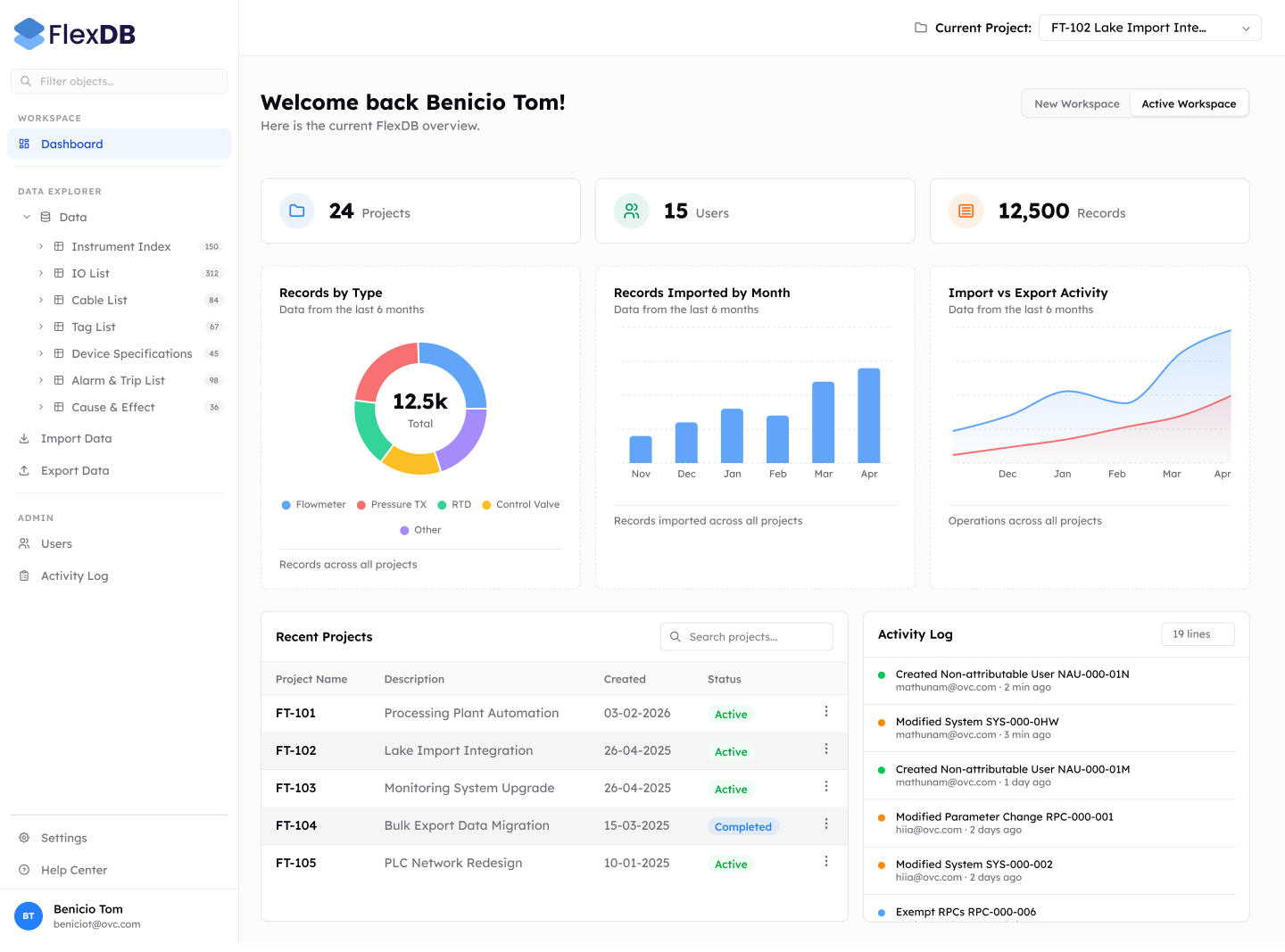
A governed database that behaves exactly like the spreadsheet it replaced.
Every interaction maps to something engineers already know how to do. The audit trail, schema enforcement, and conflict detection are invisible until they matter.
The original requirements lacked a structured entry point for new users. Research showed that engineers relied on trial and error, so I introduced a wizard-based flow: Create a project → Import data → Assign team members → Start working.
Create a project — named workspace with role-based access from the start.
Import data — guided mapping connects legacy columns to the new schema.
Assign team members — invite flow with pre-set permission levels.
Start working — confirmation screen with quick-start links to core actions.
Confidence scores surface uncertainty — engineers review flagged matches, not an error message. The system makes a decision; they confirm it.
Unrecognised columns are skipped, not rejected — the import proceeds. Engineers aren't blocked by legacy fields the schema doesn't need.
Every cell change is a timestamped, attributed record — written automatically on blur. The activity log accumulates without any manual entry, matching the URD's audit-trail requirement (timestamp, user, before/after).
Import events are first-class entries in the audit trail. Engineers (and any future auditor) can trace exactly which file introduced which data and when.
05Impact
Executive sign-off across three business units, and a live build that followed.
The strongest validation came from the client lead — the General Manager who'd authored most of the original URD and convened the OLC review.
“Tom has developed an initial UX design, analysed the underlying data structures, and defined an approach that enables delivery of a usable first version within a minimal timeframe. From there, we can iterate to build out the full required functionality. […] I was very positively impressed by the initial results. […] Both the presentation and Tom's UI demo were very well received during the OLC, and the FlexDB concept has strong support from management across multiple business units.”— General Manager, client lead
06Reflection
The URD asked for breadth. The North Star asked for restraint.
The riskiest call was choosing to build a live React prototype rather than a clickable Figma. It meant front-loading technical decisions — component library, state model, AI scaffolding workflow — into design week, not engineering week, and trusting that AI-assisted code wouldn't accumulate a tech-debt mess the development team would later have to throw out. It paid off because the OLC saw a working application, not a sequence of screenshots. The demo video was effective because the demo was real.
The real tension in this project wasn't between user needs and compliance constraints — it was between the URD's stated requirements (a long, detailed list) and the URD's stated North Star: FLEX — Flexible, Lean, Easy to use, eXtensible. The URD specified breadth; the North Star demanded restraint. Every UI call had to defend itself against both. The progressive-disclosure wizard, the top-bar project switcher, and the spreadsheet-native table model were each cases where I declined to expose a feature the URD listed by default, in order to honor the toolkit framing.
I'd run a BU-specific working session with engineers from each of the three business units earlier in the engagement — not just the cross-BU OLC at the end. The headline feedback was strong, but the BU-specific differences (Chemical & Energy's instrumentation naming conventions vs. Food & Beverage's batch metadata, for instance) didn't fully surface until handoff. Pulling those sessions into week 2 instead of week 4 would have given the development team a sharper specification of which edge cases to harden first.
“The interface that gets adopted is never the most powerful one. It's the one that feels like something you already know.”