Case Study · eLogbooks
Replacing paper logbooks with a GxP-compliant digital system built for the factory floor.
A global pharmaceutical manufacturer was running 98 paper logbooks across their site, and every one of them was a possible audit finding. I designed a digital system with two sides: a tablet interface built for gloved hands and speed on the floor, and a self-service builder that let authors set up and publish logbooks without help from engineering.
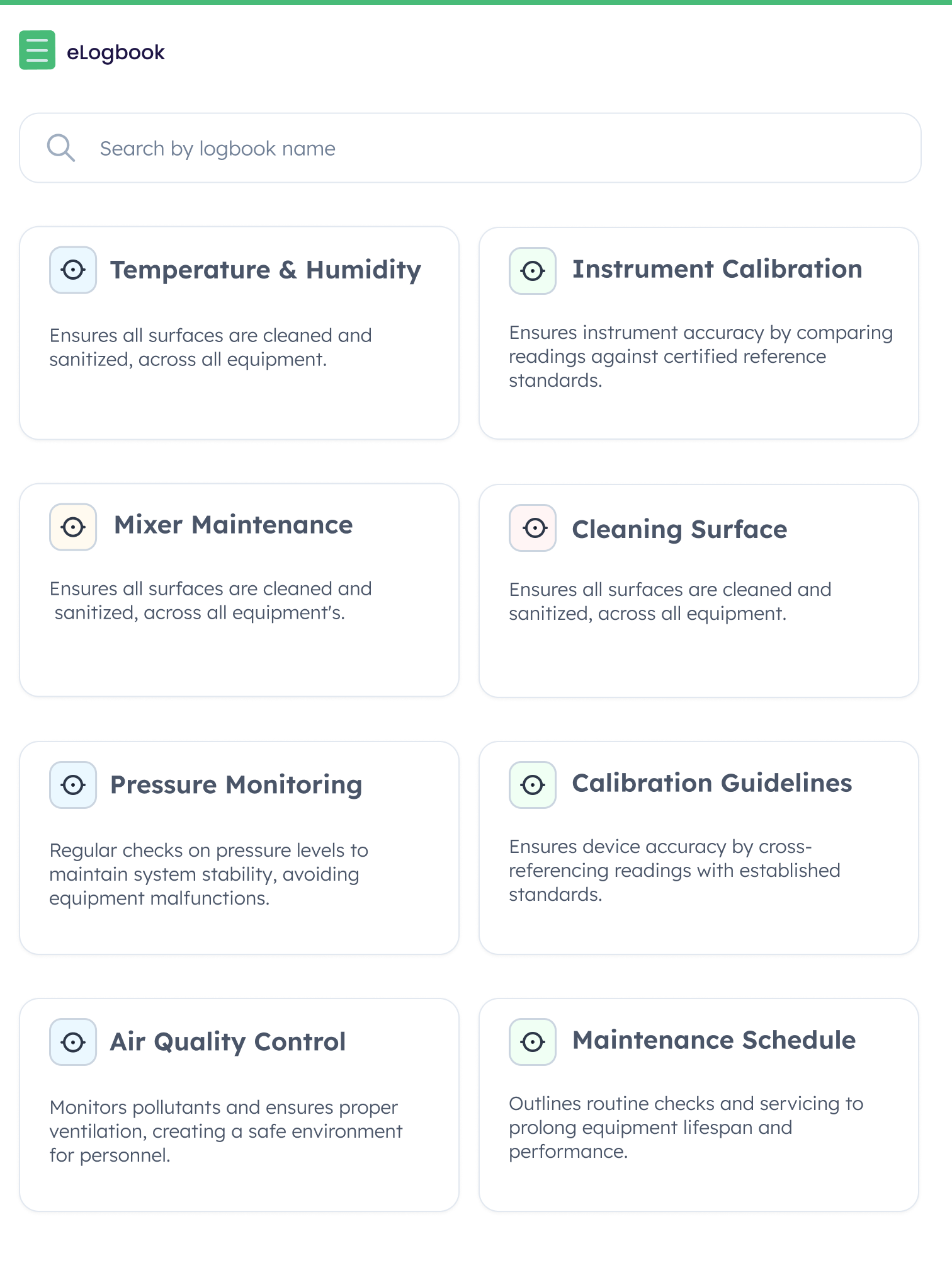
Logbook selection screen
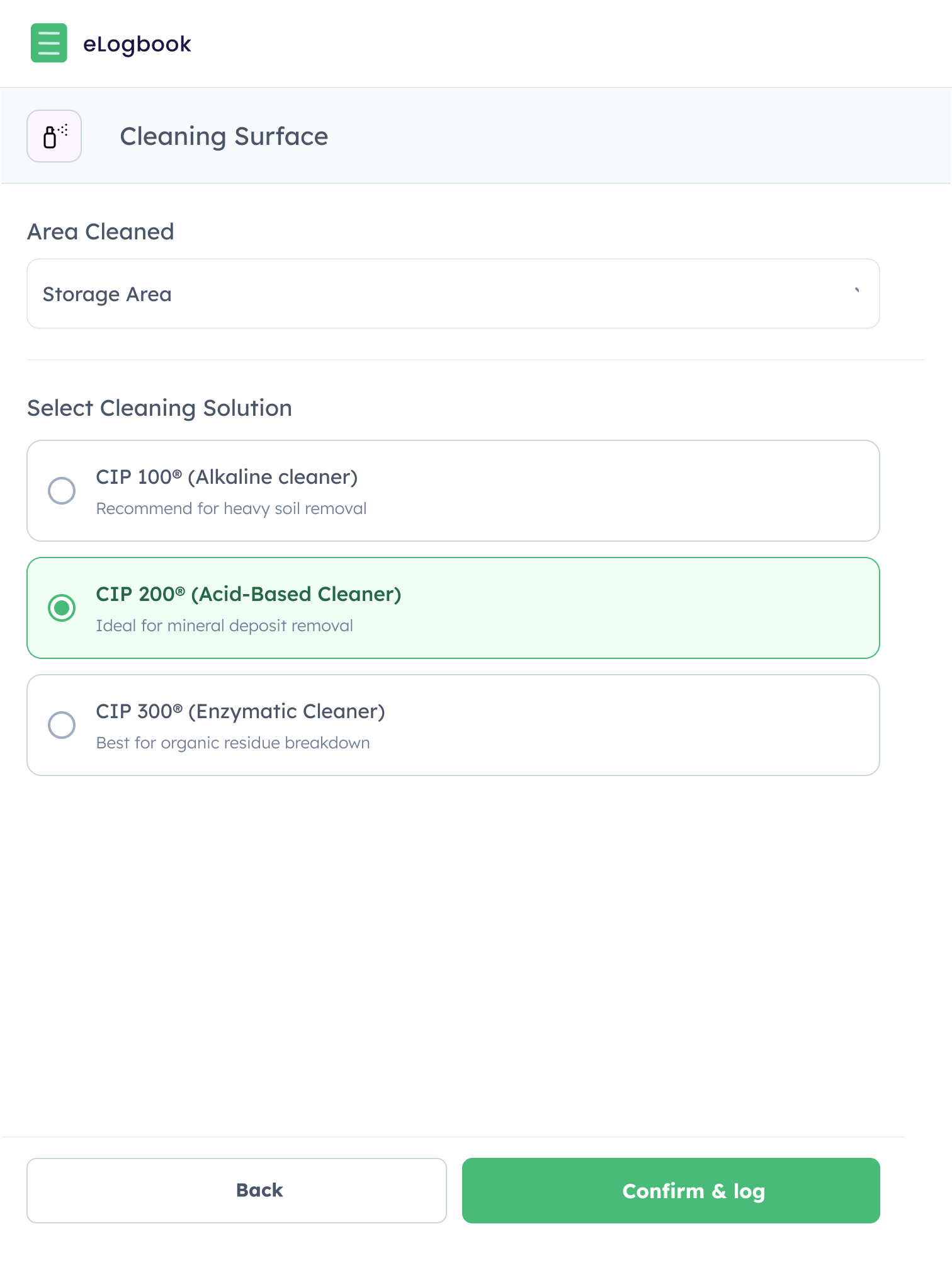
Logbook entry view
01Context
A second project built on the trust earned by the first.
eLogbooks came out of a project with a global pharmaceutical manufacturer who was already using ATReview, a compliance product I'd designed for them earlier. That experience had shown them a digital tool could handle the compliance side without getting in the way of everyday work. So they came back with a new problem: replace 98 paper logbooks across their site with something digital that their teams would actually use.
I was the only designer on the project. I owned everything from early discovery through to interaction design and the on-site usability workshop. It kicked off in mid-2025 with a blank slate. No existing product, no legacy system to build on. Just 98 logbooks, a problem statement, and a group of people who doubted we could make anything better than paper.
Most of my earlier work had been on desktop. This project came with a very different set of constraints from day one. The main interface had to work on a tablet, used by people on a factory floor who were often wearing thick gloves and always short on time. That context shaped almost every decision that followed.
| Area | My ownership | Type |
|---|---|---|
| Discovery & research | Stakeholder interviews, on-site observation, logbook inventory, operator workflow analysis | Mine alone |
| UX & interaction design | Tablet-first operator interface, desktop author/builder interface, amendment workflows, version control model | Mine alone |
| On-site usability workshop | Planned and ran a full-day workshop with operators, supervisors, and QA across three groups | Mine alone |
| Compliance design | ALCOA+ field enforcement, e-signature model, audit trail architecture, amendment justification flow | Mine alone |
| Engineering & deployment | Front-end build, back-end integration, tablet provisioning, working with the engineering team | Shared |
Process notes
Three things about how this got made that don't fit inside the numbered story.
I was the only designer across the whole engagement, working with a Product Owner and a Front-End Engineer. The product serves two groups who work in completely different ways: operators on tablets on the factory floor, and authors and supervisors on desktop in the back office. Both interfaces were mine from the first sketches through to the on-site workshop.
Good Documentation Practice usually stops well short of the interface. I treated it as a direct design input instead. Every field that couldn’t be skipped, every timestamp that filled in on its own, every justification asked for on save was a GDP rule turned into a specific interaction. The compliance rules didn’t box the design in. They made it clearer what the interface had to do. When the system enforces a complete record by default, there’s less for the operator to keep track of.
Unlike most digital transformation projects, the operators I spoke to weren’t fed up with their current process. Paper worked. It was slow and had its gaps, but it was steady and people trusted it. So the challenge wasn’t fixing something broken. It was giving people a reason to move off something that already did the job. That changed how I ran discovery. Less “what’s wrong with the current process” and more “what would make you pick this over paper?”
02The Problem
Paper makes it hard to meet compliance consistently.
Paper logbooks are a legal requirement in life sciences manufacturing. Every manual task that could affect product quality has to be recorded: equipment cleaning, environmental checks, maintenance runs. These records are what inspectors look at during audits, and logbook failures show up in the top 10 FDA GMP inspection findings every year. The problem isn't that people don't understand the requirement. It's that paper makes the requirement hard to meet the same way every time.
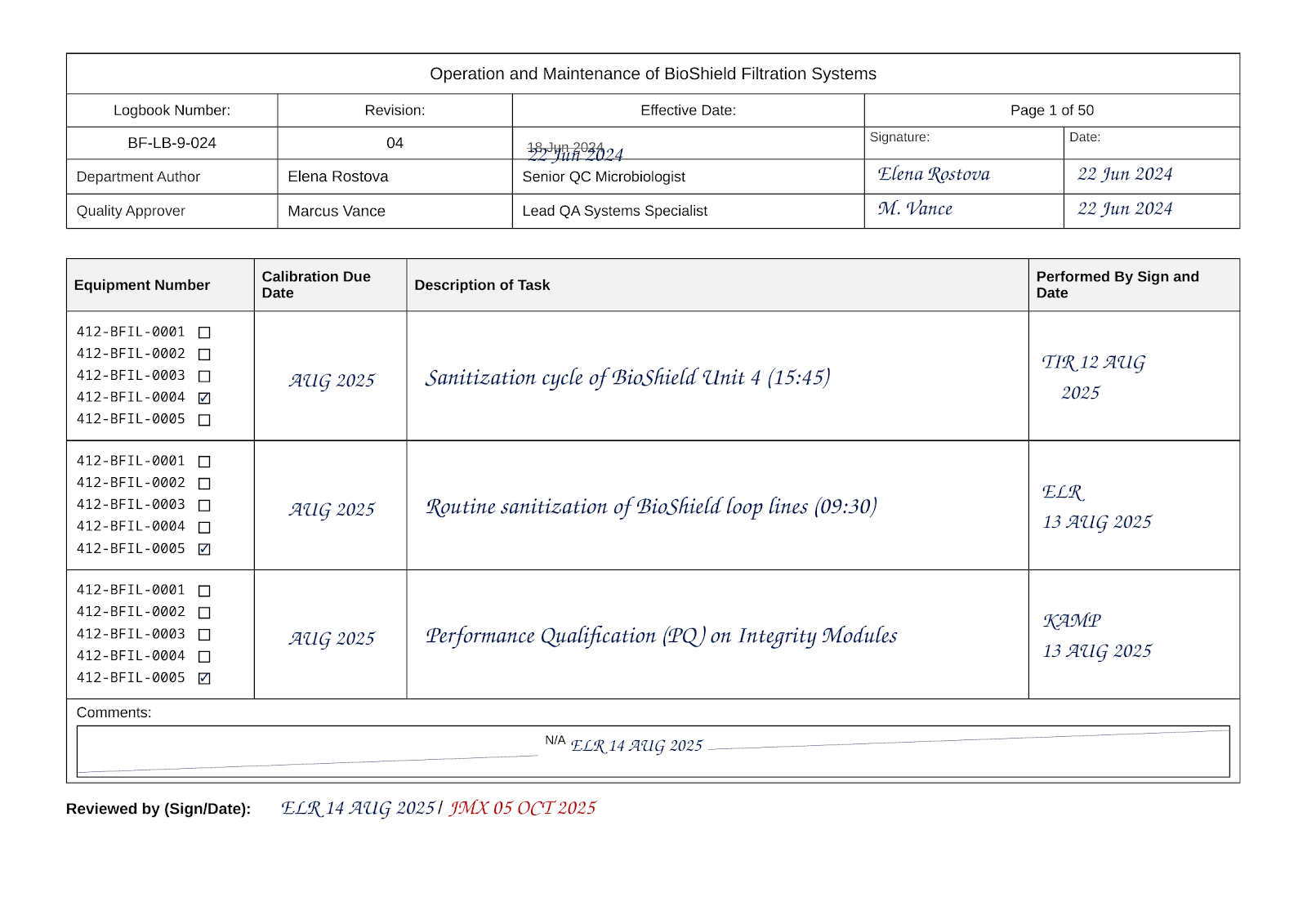 Before state
Paper logbook example
A typical paper logbook used on the factory floor. Handwritten entries, formatting that varies from person to person, and nothing checking the entry as it's written.
Note: This document has been recreated using fictional data to preserve client confidentiality.
Compliance failures happen quietly at entry and only surface later
Operators fill in logbooks on the floor, often in a hurry and sometimes in gloves. Mistakes get made: an entry in the wrong place, a field left blank, handwriting nobody can read. But those mistakes aren't caught when they happen. They turn up days later when QA reviews the physical book, which starts a correction cycle that's slow, stressful, and often can't be fixed without a formal amendment.
Manual entries · nothing checked as it's written · QA review days later
No standard way of working across departments
Every department made their own logbooks. There was no shared field structure, no shared review process, and no central view of what existed or what state it was in. Some logbooks had ALCOA+ fields. Others didn't have them at all. Getting ready for an audit meant walking the site and physically finding every book.
Every department did its own thing · no shared format · nothing visible until the book is found
Operators saw a digital tool as a way to watch them, not help them
Early discovery sessions surfaced real pushback. Operators weren't against a better process. They doubted a digital system could keep up with pen and paper, and some read it as a way to monitor them rather than help them do the job. That reaction had to be designed for, not ignored.
“If it's slower than writing it down, nobody's going to use it.”— Operator, discovery session
“The paper process enforces compliance at the wrong moment. Mistakes happen at entry, but they're caught at review, sometimes days later, by a different person. That gap is where the compliance risk sits.”
03Key Decisions
Five decisions that shaped how the product was built, and why. Every decision below came from treating three things as real design inputs: the factory floor, the audit trail requirements, and the risk that people wouldn't adopt it.
Tablet-first as a hard rule, not a responsive afterthought
SSO plus PIN over face recognition
Justify on save, so the audit trail holds without blocking the operator
A familiar logbook builder over a purpose-built one
One tablet per station, so a whole step disappears
04Solution
Two interfaces, one system, built around the people who use it.
The product has two sides. The operator interface is built for speed and no friction on the floor. The author interface is built for control and self-service in the back office. Both connect through a shared approval and version control layer.
Operator interface
Tablet-first, always on, filtered by role. Operators only see the logbooks assigned to their role and station.
Entry fields are large and clearly labelled, and they can't be skipped. Dates and the operator's identity fill in on their own. Multi-step logbooks handle each stage one at a time, with sign-off needed before the next step opens.
Amendments are reachable from any entry, and the reason is asked for as part of the save action.
Author interface
A browser-based, self-service logbook builder. Authors set up logbooks using familiar form-builder patterns (text, numeric, dropdown, date, or checkbox fields) in single-step or multi-step layouts.
Once it's set up, the logbook goes through a controlled review and approval process before it's published. Version control lets authors update a live logbook without disrupting entries already in progress.
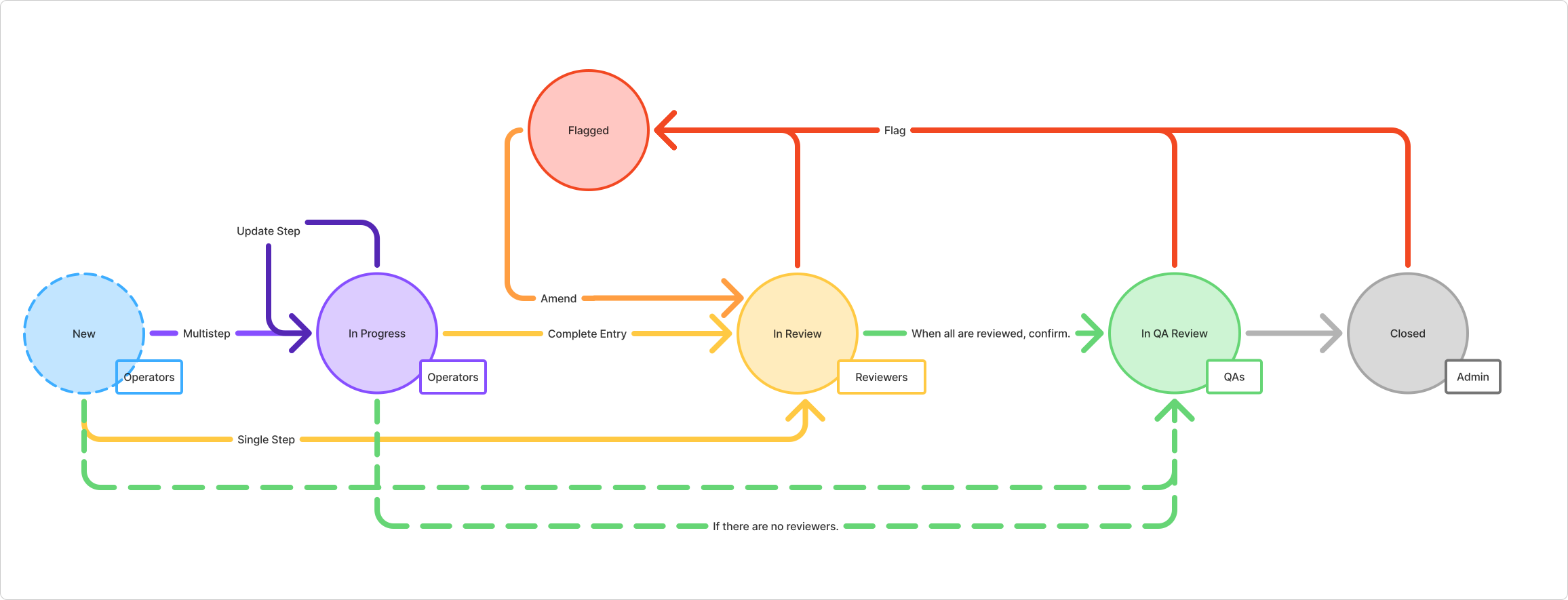
Supervisors and QA can flag entries, review by role, and sign off at their stage.
eLogbook complete workflow, from entry creation to closure
Self-service by design authors build and publish their own logbooks, with no engineering support needed.
Built for complexity multiple steps and field groups handle even the most involved logbooks.
05Usability Testing
On-site workshop with operators, supervisors, QA.
We ran a small workshop at the client's site: a full day with me, the product owner, and a front-end engineer there in person. We split it into three groups running at the same time, each with operators on tablets and supervisors or QA on laptops. We used anonymised versions of real logbook scenarios from the client's own environment.
Incomplete entries were blocked at submission. The amendment flow worked without friction. The pushback we'd seen from operators, who came in unconvinced, had shifted by the end of the day. They described it as easier than pen and paper. QA liked the flag and review flow: a clear way to send an entry back with a reason attached, in place of the informal back-and-forth the paper process needed.
06Status and Results
Controlled pilot underway, paper and digital running side by side.
The product is in a controlled pilot across two labs at the client's site. The approach is deliberate: run one paper logbook and one digital logbook next to each other before committing to the full switch. This gives operators a low-stakes way in, and gives QA a way to confirm that digital records meet their compliance standards before the wider rollout.
We scoped 98 logbooks at the start. The builder made it possible to standardise and combine them, so logbooks that had drifted into slightly different formats across departments could be unified during digitisation. The final number in use is expected to be well below 98.
Full outcomes are waiting on the pilot results. What the workshop confirmed is that the system did what it was designed to do, under realistic conditions, with real users who came in sceptical and left expecting something different.
An operator adds a logbook entry — selecting a logbook, clicking Add entry, and applying an electronic signature to sign the record
07Reflection
Compliance was the easy part. Adoption was the hard part.
The regulatory requirements were well documented, the ALCOA+ principles weren't up for debate, and the audit trail logic had clear rules. Careful design could handle all of that.
The harder part was adoption. Operators who feel watched don't engage with a new tool. They work around it. The design had to feel like it was working for them, not just for QA. Every choice about touch target size, PIN signing, pre-assigned tablets, and the pace of the entry flow was really a choice about whether the thing would get used at all.
I'd push harder to get operators in the room during the design phase, not just the testing phase. The resistance we saw in the workshop was manageable because we'd already made the right calls. But some of those calls would have been sharper with operator input from the start, especially the amendment flow and the way fields are configured in the builder.
“The system that earns adoption on the factory floor isn't the strictest one. It's the one that makes doing the job properly the fastest way to get it done.”